Administration handbook
This part of the handbook is for the admins of a kataba instance and for whoever runs its server.
Administering kataba
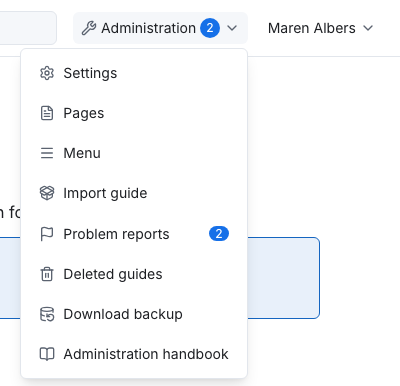
What admins do in kataba itself. They find it in the admin menu, "Administration" in the title bar, and in the buttons that only admins see on the home page and in categories. The admin menu's last entry, Administration handbook, opens this handbook in a new tab.
- Categories: building the category tree, category images, child order, visibility and deleting categories.
- Pages and the home page: standalone pages such as an imprint, and the text above the categories on the home page.
- The menu: the links in the title bar.
- Settings: the instance name, the accent colour, the default license and the other settings.
- Problem reports: what readers reported about guides, on every guide; see Problem reports in the user handbook.
- Importing and restoring guides: importing guide packages from other instances and restoring deleted guides.
- Backup and restore: downloading a backup of the whole instance and restoring it into a new one.
Operating an instance
How to run the kataba server, for whoever installs and maintains it.
- Installation: requirements, installing kataba with Node.js, creating the database and applying the schema.
- Running with Docker: the Docker image, Docker Compose, volumes and the reverse proxy.
- Configuration: all environment variables.
- Sign-in and roles: setting up Authentik and mapping its groups to roles.
- Updating: installing a new release and migrating the database.