The menu
The menu is the row of links in the title bar, beside the logo. On narrow screens it folds into a button with three lines. Admins put it together under Administration → Menu; as long as it is empty, the title bar shows none.
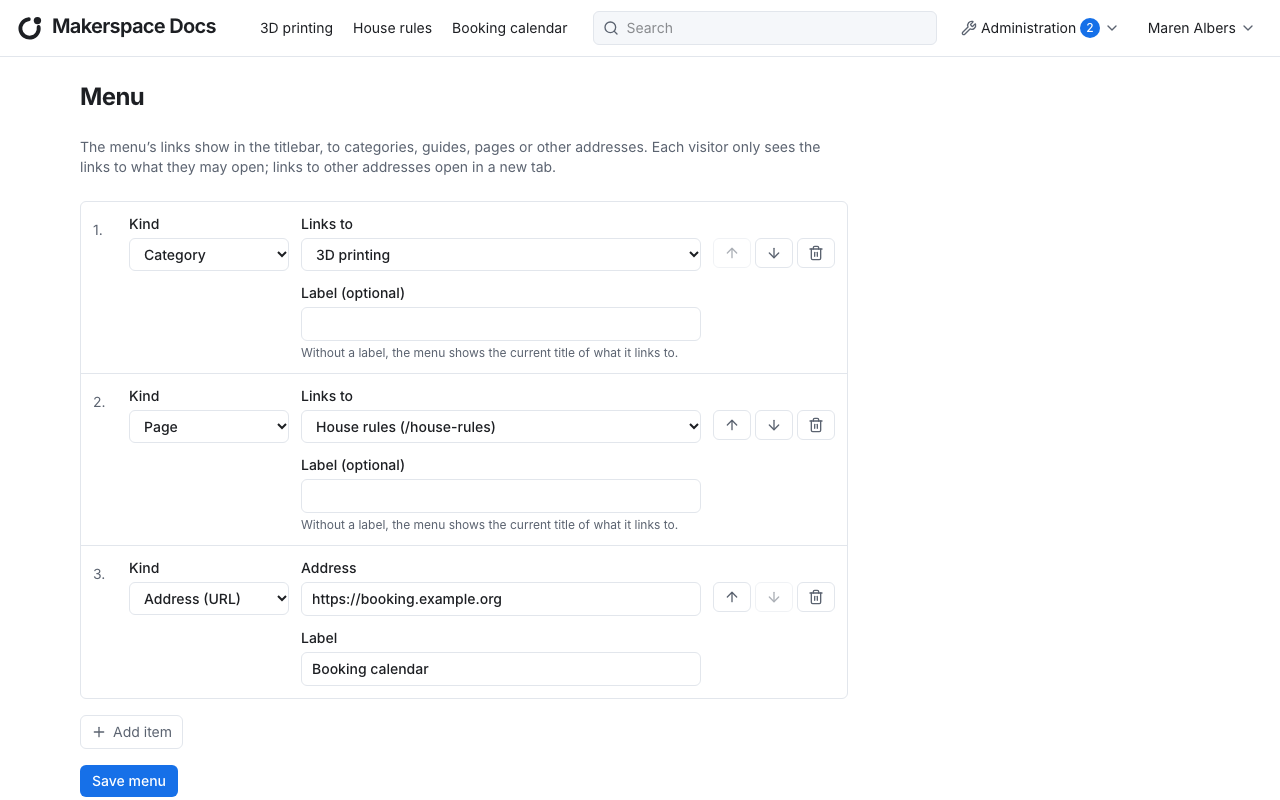
Menu items
Each menu item has a kind, which says what it links to:
- a category, a guide or a page, which you choose under Links to. Its label is optional: without one, the menu shows the current title of what it links to, so it follows a renamed category, guide or page by itself.
- an address (URL): any other website, as an absolute address starting with
http://orhttps://. It needs a label, and opens in a new tab.
Add item adds an item at the end. The arrows move an item up or down, the bin removes it. Save menu saves all changes at once.
Who sees which item
Every visitor sees only the items whose target they may open: a link to an internal category, guide or page is hidden from guests, a link to a draft from everyone who may not edit it. Links to other addresses are shown to everyone.
When the target of an item goes away:
- a deleted guide keeps its item, hidden from the menu until the guide is restored; the menu's form marks it as such;
- a deleted category or deleted page takes its items with it.